
Weather system
New to METAR?
See What is a METAR? for a beginner-friendly breakdown of how to read weather observations.
Weather in radarcontrol.io affects aircraft operations and forces you to make real decisions - rerouting traffic, approving deviations, choosing runways based on wind.
Real-time METAR and ATIS
All airports have live METAR weather observations fetched from aviation weather services. Major airports also receive live ATIS (Automatic Terminal Information Service) broadcasts. In Tower mode, the weather panel shows:
- Wind - Direction and speed (used for automatic runway selection)
- Visibility - Current visibility conditions
- Ceiling - Cloud coverage and base altitudes
- Flight category - VFR, MVFR, IFR, or LIFR
- ATIS - Current ATIS information letter and broadcast text (where available)
Simulated vs real weather
When METAR is available, wind data from the observation is used for runway selection. However, the visual weather simulation (cells, precipitation overlays) does not reflect the real METAR - it follows the weather intensity slider. This means you may see departures using a wind-appropriate runway while the simulated radar overlay shows different conditions.
METAR updates
METAR data is cached and refreshes approximately every 15 minutes. If no METAR is available for an airport, the simulation falls back to generated wind conditions.
Weather intensity
Use the Weather slider in the control panel (right side) to adjust weather conditions from calm to severe:
- 0% - Clear skies, no weather cells, light winds
- 25% - Light weather, occasional small cells
- 50% - Moderate weather, multiple cells, stronger winds
- 75% - Heavy weather, larger cells, significant wind
- 100% - Severe weather, large intense cells, strong winds
Weather overlays
Weather radar
Toggle the Radar overlay checkbox to display convective weather cells on the radar scope. Cells are rendered with a pixelated appearance similar to real ATC radar displays.
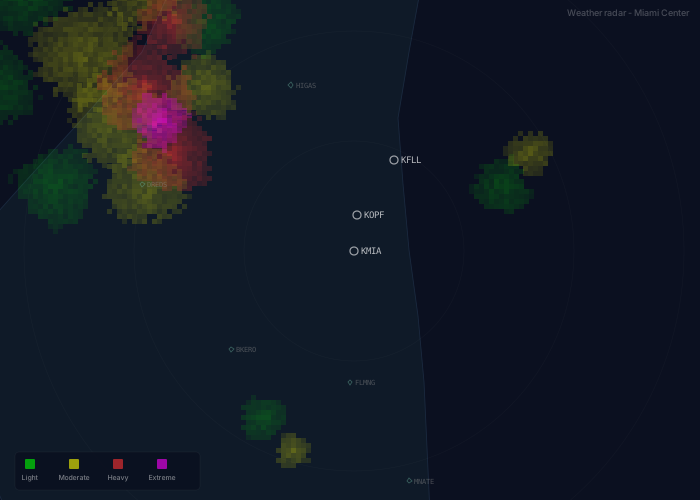
Use the Opacity slider (0-50%) to adjust the transparency of the weather overlay. Lower values make the weather more transparent so aircraft and waypoints remain clearly visible.
Color coding by intensity:
- Green - Light precipitation
- Yellow - Moderate precipitation
- Red - Heavy precipitation
- Magenta - Extreme/severe weather
Cells grow, mature, and dissipate over time. They drift with upper-level winds, typically moving 15-60 knots depending on conditions.
Wind barbs
Toggle the Wind barbs checkbox to display standard meteorological wind barbs across the radar scope. Use the altitude selector to view winds at different flight levels:
- SFC - Surface wind
- FL100 - 10,000 feet
- FL200 - 20,000 feet
- FL300 - 30,000 feet
- FL400 - 40,000 feet
Reading wind barbs:
- The barb points in the direction the wind is coming FROM
- Half barb = 5 knots
- Full barb = 10 knots
- Pennant (triangle) = 50 knots
Wind effects on operations
Runway selection
When weather is active, departing aircraft automatically use runways aligned with the surface wind direction. Aircraft take off into the wind, so runway heading will match the wind direction.
Example: With wind from 270° (westerly), departures will use runway 27.
Wind layers
Wind varies with altitude:
- Surface winds are lightest
- Winds increase with altitude
- Direction veers (shifts clockwise) with height
- Upper-level winds can be significantly stronger
Deviation requests
When aircraft detect weather cells in their flight path, they will request deviations to avoid the weather.
Deviation request panel
When an aircraft requests a deviation, a panel appears showing:
- Callsign - Aircraft requesting deviation
- Direction - LEFT or RIGHT with distance (e.g., "LEFT 15nm")
- Reason - Description of the weather threat
Controller actions
- Approve - Aircraft turns 30° in the requested direction and the heading vector shows on radar
- Deny - Aircraft maintains current route
CRITICAL
Denying a deviation request risks losing the aircraft. If you deny a deviation and the aircraft flies into severe weather, it may be lost. A crash screen will appear showing the incident. Weather deviations exist for safety and should almost always be approved.
Radio calls
When a deviation request is generated:
- Pilot request appears in the radio banner: "DYNASTY 828, request left deviation two zero miles for weather"
- When approved, ATC clearance followed by pilot readback: "DYNASTY 828, deviation approved, left of course approved"
- If denied, ATC denial followed by pilot acknowledgment: "DYNASTY 828, unable deviation, maintain present course"
TIP
Deviation requests auto-approve after 60 seconds if not handled. In real ATC, pilots have authority to deviate for weather safety.
Scripting API
Weather data is available through the scripting API for custom scenarios.
Querying weather
// Get wind at specific altitude
const wind = weather.windAt(35000);
console.log(`FL350: ${wind.dirDeg}° at ${wind.kts} knots`);

// Get surface wind
const surface = weather.surfaceWind();
console.log(`Surface: ${surface.dirDeg}° at ${surface.kts} knots`);

// Get all weather cells
const cells = weather.cells();
for (const cell of cells) {
  console.log(`Cell at ${cell.center.lat}, ${cell.center.lon}`);
  console.log(`  Radius: ${cell.radiusNm}nm, Intensity: ${cell.intensity}`);
}

// Get current intensity setting
const intensity = weather.intensity();
Deviation request event
// Handle deviation requests in script
onDeviationRequest((request) => {
  console.log(`${request.callsign} requesting ${request.direction} deviation`);
  console.log(`Reason: ${request.reason}`);

  // Return true to approve, false to deny, undefined to leave pending
  return true; // Auto-approve all deviations
});
Request properties
| Property | Type | Description |
|---|---|---|
id | string | Unique request identifier |
callsign | string | Aircraft callsign |
direction | 'left' | 'right' | Requested deviation direction |
deviationNm | number | Requested deviation distance in nm |
reason | string | Human-readable reason |
weatherCellId | string | ID of the threatening weather cell |
Tips
- Keep weather radar on so you see cells before your pilots do
- Route aircraft around weather proactively - don't wait for deviation requests
- Weather cells have vertical limits. Sometimes climbing above is easier than going around.
- Approve deviations fast. Delays mean aircraft fly closer to the weather.
- More weather = more deviations = more spacing needed