
Arrivals & ILS approaches
How arrival traffic, ILS approaches, and tower handoffs work in radarcontrol.io.
Want ground control?
After handing off to tower, want to manage the landing, taxi, and gate operations yourself? Check out Tower mode at 300+ airports.
Overview
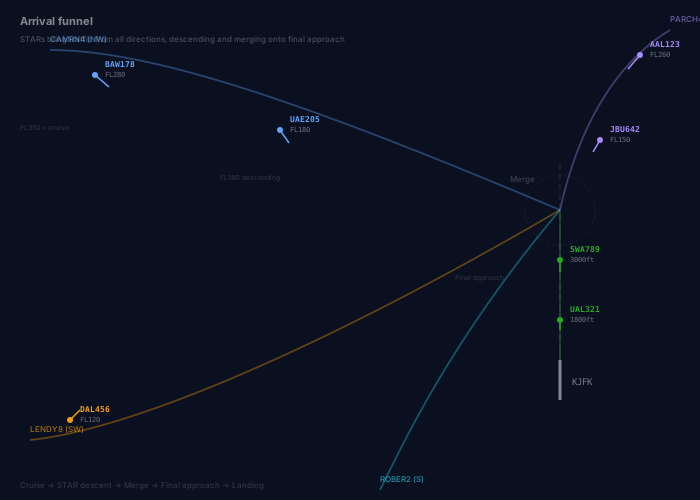
Arrivals enter at cruise altitude. You descend them (usually via a STAR), vector to the ILS, and hand off to tower. The full flow:
- Entry - Aircraft enters sector at cruise altitude, assigned a STAR
- STAR descent - Issue
dv(descend via) to follow the published arrival procedure, or assign altitudes manually - Vectoring - Vector aircraft toward the ILS intercept zone
- ILS Clearance - Clear aircraft for the ILS approach
- Establish on Localizer - Aircraft captures and tracks the localizer
- Glideslope Capture - Aircraft intercepts the glideslope and descends
- Tower Contact - Hand off to tower before landing
- Landing - Aircraft touches down and exits the simulation
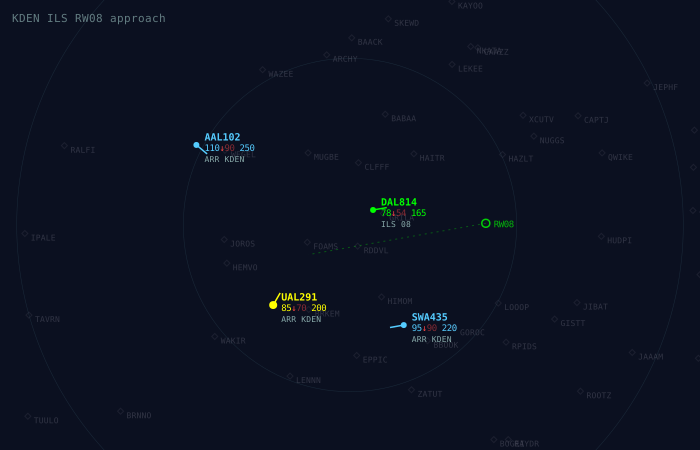
Multiple arrivals at Denver: DAL814 established on the ILS 08 localizer (green), UAL291 turning base to final, SWA435 on downwind heading west, AAL102 descending to join the pattern.
New to ATC?
Learn the basics: What is an ILS approach? | What is a go-around? | What is a SID/STAR? | What is a holding pattern?
STAR procedures
Most arrivals have a STAR (Standard Terminal Arrival Route) assigned. Use dv to activate it - the aircraft handles its own descent profile. See SIDs & STARs for the full guide.
Arrivals without ILS clearance
If an arrival reaches the last waypoint in its route without receiving an ILS clearance, it will hold at that point until you clear it for an approach. Don't forget to issue i 27L (or the appropriate runway) before the aircraft reaches the end of its route.
ILS approach basics
What is an ILS?
The Instrument Landing System (ILS) provides precision lateral (localizer) and vertical (glideslope) guidance for landing. In radarcontrol.io:
- Localizer - Provides lateral guidance aligned with the runway centerline
- Glideslope - Provides a 3-degree descent path to the runway threshold
- Decision Height - Aircraft commits to landing at 200ft AGL
Learn more about ILS approaches
Approach states
Aircraft on approach progress through these states:
| State | Description | Speed |
|---|---|---|
vectoring | Being vectored toward the approach | 220 kts |
intercepting | Turning to capture the localizer | 180 kts |
established | On localizer, above glideslope | 160 kts |
final | On glideslope, descending | 145 kts |
landing | Below 200ft AGL, committed to land | 130 kts |
Speed Management
The simulator automatically manages approach speeds. Aircraft will decelerate through each phase without explicit speed instructions, though you can override this if needed.
Interactive instructions
ILS clearance
Clear an aircraft for an ILS approach to a specific runway.
Syntax:
i [RUNWAY]orils [RUNWAY]- Clear ILS approach- Runway format:
27L,09R,4R,36, etc.
Examples:
DAL123 i 27L         # Clear ILS runway 27L
SWA456 ils 09        # Clear ILS runway 09
AAL789 i 4R          # Clear ILS runway 4 right
Prerequisites
For an ILS clearance to succeed:
- Aircraft heading must be within 30° of runway heading
- Aircraft must be 5-20nm from the runway threshold
- Aircraft altitude must allow glideslope capture
- The runway must have ILS equipment
Tower contact
Hand off the aircraft to tower control. This is required for landing to complete.
Syntax:
tortwrortower- Contact tower
Examples:
DAL123 twr           # Contact tower
SWA456 t             # Contact tower (short form)
Important
Without tower contact, aircraft will continue the approach but cannot complete the landing. Always issue tower contact before the aircraft reaches decision height (200ft AGL).
Go-around
Instruct an aircraft to abort the approach and climb.
Syntax:
ga- Go around
Examples:
DAL123 ga # Go aroundAfter a go-around:
- Aircraft climbs to 3,000ft above airport elevation
- Aircraft regains controllability
- Runway protection is cleared
- You can re-vector for another approach
Combined instructions
Instructions can be chained together:
DAL123 c50 i 27L            # Descend to 5000ft, clear ILS 27L
SWA456 i 09R twr            # Clear ILS 09R and contact tower immediately
AAL789 c30 s200 i 4R        # Descend FL30, speed 200, clear ILS 4R
Vectoring to the ILS
Aircraft at various stages of the ILS approach: DAL814 established on the localizer (green), UAL291 turning base to intercept, SWA435 on downwind, AAL102 descending to join the sequence.
Intercept geometry
For a successful ILS intercept, aircraft must be:
- Heading: Within 30° of the runway heading
- Distance: 5-20nm from the threshold
- Altitude: At or below glideslope altitude (+500ft margin)
- Side: Approaching from in front of the threshold (not behind)
Vectoring procedure
- Descend the aircraft to an appropriate altitude (typically 3,000-6,000ft depending on distance)
- Turn the aircraft toward the localizer at an intercept angle of 20-30°
- Clear ILS when within the intercept zone
Example Sequence:
DAL123 c60                   # Descend to FL60 (6,000ft)
DAL123 h270                  # Turn heading 270 (30° intercept to RWY 24)
DAL123 i 24L                 # Clear ILS runway 24L
Localizer extension
The radar display shows the localizer centerline extending from each runway. Use this visual aid to:
- Plan your intercept vectors
- Judge when to turn aircraft toward the localizer
- Verify aircraft are established on centerline
Visual Guidance
When an aircraft is cleared for the ILS, its target track line on the radar will show the expected path to the runway.
Scripting API
Arrival events
onApproachCleared(callback)
Called when an aircraft is cleared for an ILS approach.
onApproachCleared((event) => {
  log(`${event.cs} cleared ILS ${event.runway} at ${event.airport}`);
});
Event Object:
{
  cs: string,        // Aircraft callsign
  airport: string,   // Airport ICAO code
  runway: string     // Runway identifier
}
onILSEstablished(callback)
Called when an aircraft establishes on the localizer.
onILSEstablished((event) => {
  log(`${event.cs} established ILS ${event.runway}`);
});
onTowerContact(callback)
Called when an aircraft is handed off to tower.
onTowerContact((event) => {
  log(`${event.cs} contact tower for ${event.runway}`);
});
onLanding(callback)
Called when an aircraft touches down.
onLanding((event) => {
  log(`${event.cs} landed ${event.airport} runway ${event.runway}`);
});
onGoAround(callback)
Called when an aircraft executes a go-around.
onGoAround((event) => {
  log(`${event.cs} going around: ${event.reason}`);
});
onUnableILS(callback)
Called when an aircraft cannot accept an ILS approach (pilot reports "unable").
onUnableILS((event) => {
  log(`${event.cs} unable ILS ${event.runway}: ${event.reason}`);
});
Reason values:
'heading'- Aircraft heading too far from runway'too_close'- Less than 5nm from threshold'too_far'- More than 20nm from threshold'too_high'- Above glideslope + 500ft'wrong_side'- Behind the runway threshold'no_ils'- Runway has no ILS equipment
Aircraft control methods
clearILS(runway)
Clear the aircraft for an ILS approach.
onSpawn((aircraft) => {
  // For arrivals, set up approach
  if (aircraft.destinationAirport) {
    aircraft.over("FINAL", (ac) => {
      ac.clearILS("27L");
    });
  }
});
Returns: boolean - true if clearance was successful
contactTower()
Hand off the aircraft to tower control.
onILSEstablished((event) => {
  const ac = traffic.byCallsign(event.cs);
  if (ac) {
    // Hand off to tower when established
    ac.contactTower();
  }
});
goAround()
Instruct the aircraft to go around.
// Go around if runway becomes occupied
onTick(({ traffic }) => {
  traffic.all().forEach(ac => {
    if (ac.approachState === 'final' && isRunwayBlocked(ac)) {
      ac.goAround();
    }
  });
});
Aircraft properties
Aircraft on approach have additional properties:
aircraft.approachState    // 'vectoring' | 'intercepting' | 'established' | 'final' | 'landing'
aircraft.clearedILS       // boolean - has been cleared for ILS
aircraft.contactedTower   // boolean - has been handed to tower
aircraft.destinationAirport // string - ICAO code of destination
CenterAPI methods
Low-level approach control methods:
center.clearILS(callsign, runway)      // Clear for ILS
center.contactTower(callsign)          // Contact tower
center.goAround(callsign)              // Go around
center.isOnApproach(callsign)          // Check if on approach
center.getApproachState(callsign)      // Get current state
center.isRunwayProtected(airport, rwy) // Check runway protection
Example: automated arrival handling
// Handle arrivals
onSpawn((aircraft) => {
  if (!aircraft.destinationAirport) return;

  log(`${aircraft.cs} arrival for ${aircraft.destinationAirport}`);

  // Descend toward approach altitude
  aircraft.descend(6000);
  aircraft.speed(250);

  // Direct to final approach fix
  aircraft.direct("FINAL");
});

// Clear ILS when in position
onTick(({ traffic }) => {
  traffic.all().forEach(ac => {
    if (ac.destinationAirport && !ac.clearedILS) {
      // Try to clear ILS
      const cleared = ac.clearILS("27L");
      if (cleared) {
        log(`${ac.cs} cleared ILS 27L`);
      }
    }
  });
});

// Hand off to tower when established
onILSEstablished((event) => {
  const ac = traffic.byCallsign(event.cs);
  if (ac) {
    ac.contactTower();
    log(`${event.cs} contact tower`);
  }
});

// Log landings
onLanding((event) => {
  log(`${event.cs} landed safely!`);
});
Holding patterns
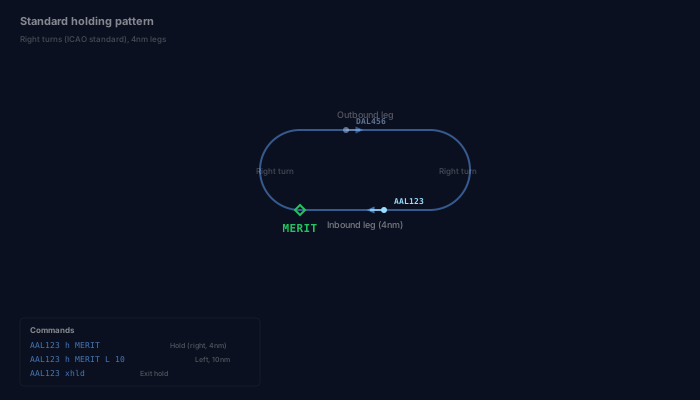
When arrival demand exceeds runway capacity, use holding patterns to delay aircraft before sequencing them for approach.
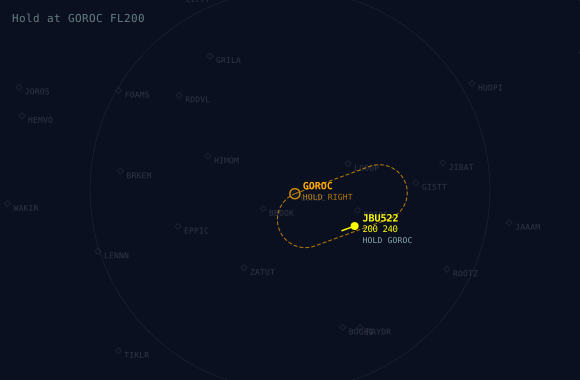
JBU522 holding at GOROC at FL200 with standard right turns. The orange racetrack shows the hold pattern shape.
When to hold
- More arrivals than the runway can handle
- Runway temporarily closed (go-around, vehicle on runway)
- Weather requiring spacing adjustments
- Waiting for a gap in departure flow
Hold commands
AAL123 h MERIT             # Hold at MERIT (right turns, 4nm legs)
DAL456 h MERIT L           # Hold at MERIT, left turns
UAL789 h ROBUC R 10        # Hold at ROBUC, right turns, 10nm legs
SWA321 h MERIT L 10 e 3600 # Hold with EFC at time 3600
AAL123 xhld                # Exit hold, resume route
See the full hold command reference for all options.
Scripting holds
// Hold arrivals when runway is protected
onTick(({ traffic }) => {
  traffic.all().forEach(ac => {
    if (ac.destinationAirport && !ac.clearedILS) {
      if (center.isRunwayProtected(ac.destinationAirport, "27L")) {
        ac.hold("MERIT");
      }
    }
  });
});
Runway protection
The simulator enforces runway protection to prevent multiple aircraft from approaching the same runway simultaneously.
- Protection Zone: 5nm from threshold
- One aircraft at a time per runway
- Protection clears when aircraft lands or goes around
Check runway status:
const occupied = center.isRunwayProtected("KJFK", "27L");
if (occupied) {
  log("Runway 27L is protected - hold aircraft");
}
Approach speed reference
Default approach speeds by aircraft type:
| Aircraft Category | Intercept | Established | Final | Landing |
|---|---|---|---|---|
| Light jet (CRJ, E145) | 160 kts | 140 kts | 130 kts | 115 kts |
| Narrowbody (A320, B737) | 180 kts | 160 kts | 145 kts | 130 kts |
| Widebody (A330, B777) | 190 kts | 170 kts | 155 kts | 145 kts |
| Super heavy (A380, B747) | 200 kts | 175 kts | 160 kts | 150 kts |
TIP
Aircraft automatically adjust their speed based on approach phase. Manual speed assignments will override automatic speed management.
Troubleshooting
"Unable ILS" messages
| Reason | Solution |
|---|---|
| Heading too far | Vector aircraft closer to runway heading (within 30°) |
| Too close | Clear aircraft earlier (5+ nm from threshold) |
| Too far | Wait until aircraft is within 20nm of threshold |
| Too high | Descend aircraft before clearing approach |
| Wrong side | Aircraft is behind runway - vector around |
Aircraft not landing
If an aircraft reaches the runway but doesn't land:
- Check tower contact - Did you issue
twrinstruction? - Aircraft will not complete landing without tower handoff
Go-around situations
Consider a go-around when:
- Runway becomes occupied
- Aircraft is too high on glideslope
- Spacing from preceding aircraft is too tight
- Weather conditions change
Quick reference
ILS INSTRUCTIONS
  i 27L, ils 27L     Clear ILS runway 27L
  t, twr, tower      Contact tower (required for landing)
  ga                 Go around

HOLDING
  h MERIT            Hold at MERIT (right turns, 4nm legs)
  h MERIT L 10       Hold left turns, 10nm legs
  xhld               Exit hold, resume route

COMBINED EXAMPLES
  DAL123 c50 i 27L           Descend 5000, clear ILS
  SWA456 i 09R twr           Clear ILS 09R, contact tower
  AAL789 ga                  Go around

INTERCEPT REQUIREMENTS
  Heading:  Within 30° of runway heading
  Distance: 5-20nm from threshold
  Altitude: Below glideslope + 500ft

APPROACH STATES
  vectoring     → intercepting → established → final → landing

SCRIPTING EVENTS
  onApproachCleared, onILSEstablished, onTowerContact
  onLanding, onGoAround, onUnableILS